


125 Character Preview: 4 Step Instagram Captions for Small Businesses

Instagram gives you up to 2,200 characters per caption, but only the first roughly 125 characters show before the feed cuts to “more.” That gap between what you’re allowed and what actually gets seen is the whole game. Write your hook, your CTA, or your best line first. Everything else is backup material for the people who tap through.
TL;DR:
Captions should prioritize the first 125 characters to ensure the key message or hook is visible before truncation on mobile feeds.
Using the full 2,200-character limit is unnecessary for most posts, but awareness helps when creating long-form captions or carousels.
Short, punchy captions under 125 characters are better for quick reactions like likes, while longer ones increase shares and saves, depending on the goal.
Different post types require tailored caption lengths, with Reels needing brevity and carousels supporting longer storytelling, often up to 1,000 characters.
Testing caption length against engagement patterns is more effective than chasing a fixed ideal number, emphasizing the importance of a strong hook first.
What Are Instagram’s Character Limits for Captions, Bios, and DMs?
Before you write another caption, it helps to know exactly what Instagram counts and where the platform draws its lines. The rules are more specific than most creators realize, and mixing them up leads to captions that get cut off mid-thought or hashtag blocks that silently eat your character budget.
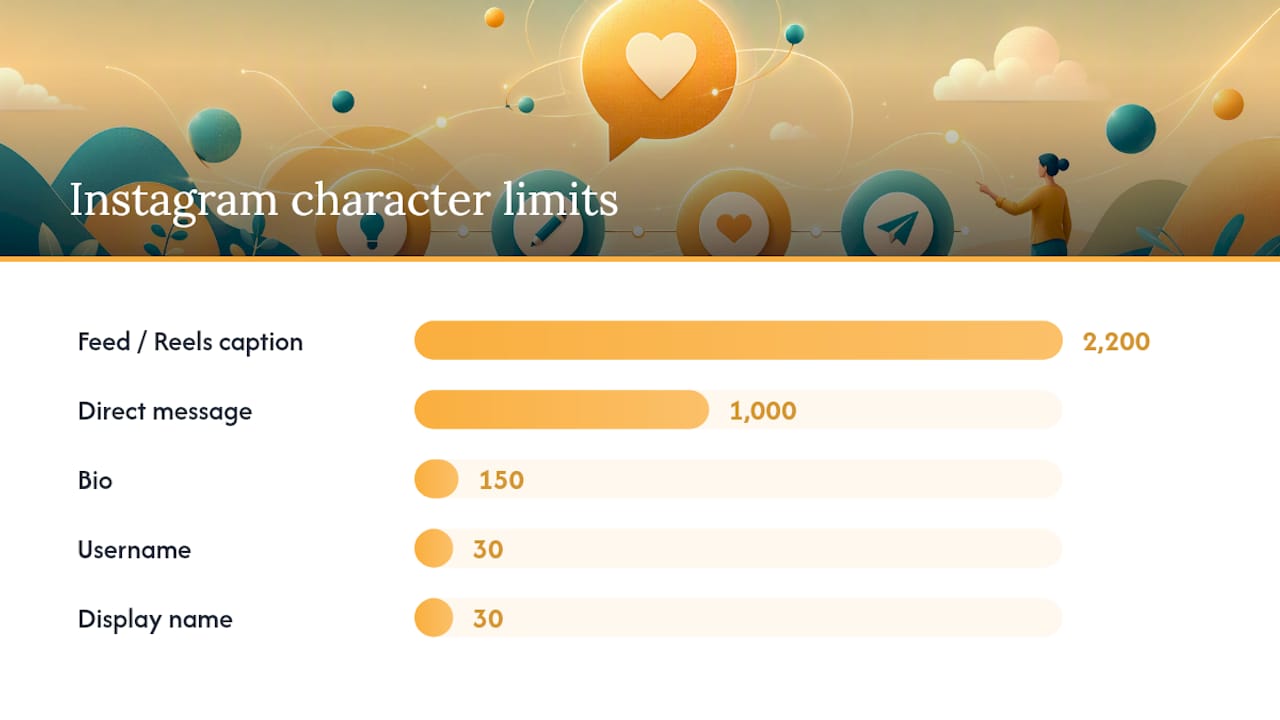
The feed caption limit sits at 2,200 characters, which includes every letter, number, space, emoji, hashtag, and @mention you type. That’s a hard technical ceiling set by Instagram, not a style suggestion. In practice, almost nobody needs all 2,200 characters, but knowing the number matters when you’re writing a long-form carousel caption and want to check you haven’t gone over.
Instagram’s other text fields have their own limits, and Sendible’s breakdown of these specs is worth bookmarking if you manage multiple accounts:
Field | Character limit |
Feed/Reels caption | 2,200 |
Bio | 150 |
Comment | 2,200 |
Direct message | 1,000 |
Username | 30 |
Display name (full name) | 30 |
Hashtags deserve their own note. Instagram caps you at 30 hashtags per post, and every character in those tags counts toward your 2,200 caption limit. A caption padded with 20 hashtags might leave you with far less room for actual writing than you think, especially once you factor in mentions and emojis, which also count as full characters. If you want a sharper hashtag strategy that doesn’t eat your caption space, SOL Social Media’s hashtag playbook walks through how to pick fewer, better tags instead of maxing out the count.
Why Caption Length Determines Whether Anyone Reads Your Post
Instagram truncates captions in the feed after roughly 125 characters on mobile, replacing the rest with “more.” That’s the visible preview window, and it’s shorter than most people expect. Two full sentences, maybe three short ones, and you’ve hit it. Desktop tends to show a bit more text before truncating, but mobile is where the overwhelming majority of your audience scrolls, so plan for the tighter constraint.
This is why caption length isn’t really about hitting a word count. It’s about controlling what happens in that first 125 characters. If your hook, question, or key benefit lands after the cutoff, most people never see it. They either scroll past or they don’t tap “more,” and either way, your best line just got buried.
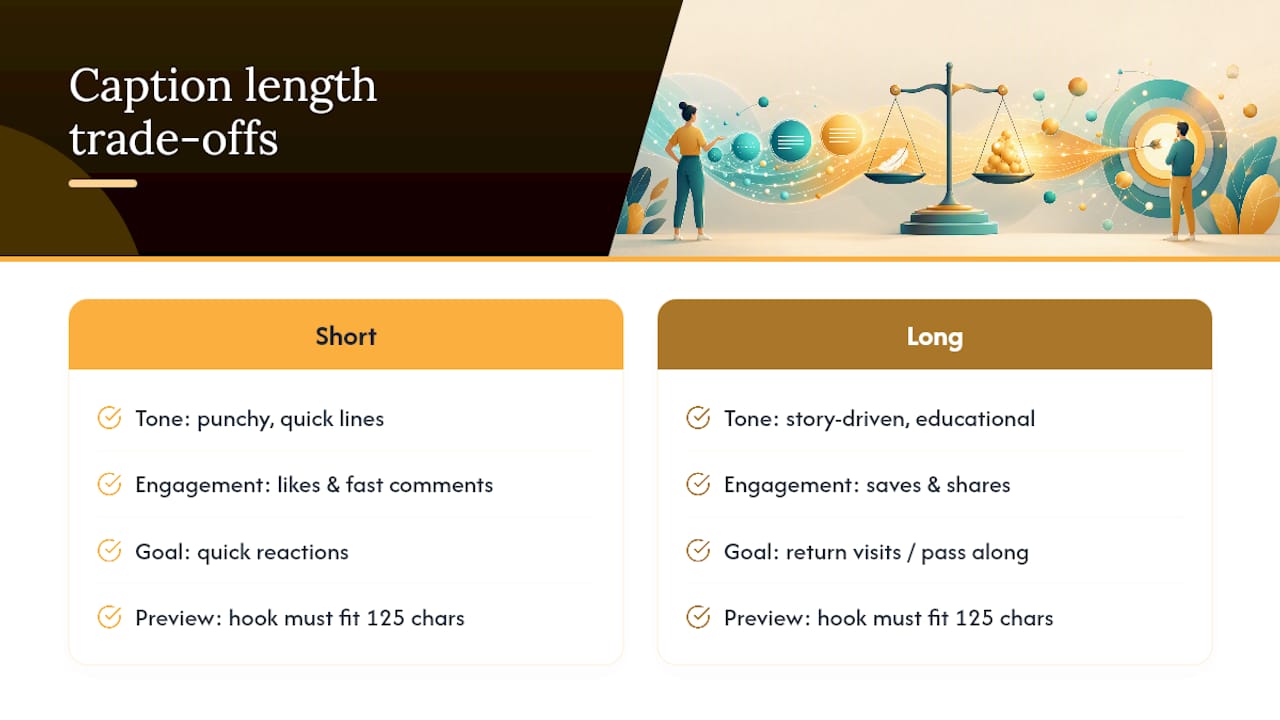
Length also shapes which engagement signals you’re likely to collect. Shorter, punchier captions tend to drive quick reactions: likes and fast comments. Longer, story-driven or educational captions tend to earn more saves and shares, because they give people a reason to come back or pass the post along, a pattern Hootsuite’s platform-length research backs up across formats. Neither is “better” universally; they serve different goals.
Keyword strategy inside the caption matters too, separate from hashtags. Instagram’s search and recommendation systems do read caption text, so working in a natural phrase your audience searches for helps discovery. Stuffing keywords or hashtags into every line reads as spam and can hurt readability without meaningfully improving reach.
How Long Should an Instagram Caption Be for Each Post Type?
There’s no single ideal Instagram caption length, because the right length depends on what the post is doing. A Reel and a carousel tutorial are asking different things of the viewer, and the caption should match that job.
Reels and quick hooks: Keep it under 125 characters when possible. Reels already carry the story visually, so a short caption that reinforces the hook or adds a punchline works better than a paragraph competing with the video.
Single feed photos: Aim for one to three sentences, roughly 150 to 300 characters, with the CTA or context stated in the first line. This gives enough context without demanding a “more” tap for casual scrollers.
Carousels and tutorials: Longer captions, often 300 to 1,000 characters, perform well here because carousel viewers are already committed to swiping and reading. Step-by-step breakdowns, numbered tips, or a short story arc drive saves and comments.
Sponsored posts: Treat these like ads. Shorter is almost always safer, since Hootsuite’s guidance on paid and sponsored content notes that people scroll past promotional posts faster than organic ones, so a tight, benefit-first caption outperforms a long pitch.
Stories: Text overlays should be a sentence or less. Stories are consumed in seconds, and any caption-style text needs to be readable at a glance, not read like a caption.
If you’re building out a content calendar and want format-specific examples beyond captions, SOL Social Media’s guide to 12 engaging post formats breaks down which formats pair with which content goals.
How Do You Decide the Right Caption Length for a Post?
Rather than guessing at a number, run each caption through a short decision process before you hit publish. This takes about two minutes once it’s a habit, and it keeps you from defaulting to whatever length feels comfortable that day.
Name the goal. Are you chasing awareness, saves, comments, or link clicks? A save-driven post (a recipe, a checklist) can support more length than a pure awareness post meant to just get a like and a scroll.
Match format to length band. A Reel goal paired with a long caption is a mismatch; a carousel goal paired with three words wastes the format’s strength. Pick the length band from the post-type guidance above and commit to it.
Write the hook first, then the CTA placement. Your first line has to earn the “more” tap on its own, whether that’s a question, a bold claim, or a specific number. Decide where your CTA goes: right after the hook for short captions, or at the end for longer storytelling captions where you’re building toward it.
Run the checklist before posting: Does the first 125 characters make sense on its own? Are hashtags separate from the core message? Does the caption length match the goal you named in step one? If any answer is no, revise before you schedule.
This isn’t a one-time decision you make and forget. Testing caption length against your specific account’s engagement patterns tends to predict performance better than following any single “ideal” number, because audience behavior varies by niche, by follower size, and even by posting time.
Writing Tips That Make Your Caption Length Work Harder
Length is only half the equation. How you use that length determines whether people actually read it.
Open with a hook, not a setup. A question, a surprising number, or a direct benefit statement in the first sentence beats “So today I wanted to talk about…” every time. You have about 125 characters to prove the caption is worth a tap.
Break text into short chunks. Line breaks every one or two sentences make long captions scannable instead of intimidating. A wall of unbroken text, even a good one, gets skipped.
Use emojis as visual breaks, not decoration. One or two emojis at natural pause points can replace a line break and add tone, but a caption sprinkled with emojis every few words reads as cluttered rather than lively.
Decide hashtag placement based on the caption’s job. For punchy, hook-first captions, move hashtags to the first comment to keep the caption clean. For longer, discovery-focused captions, a small relevant set at the end can work fine since the reader has already engaged.
Match length to the outcome you’re chasing. A long caption earns saves and shares when it delivers real value (a tutorial, a story with a payoff), but it costs you readers who won’t commit the time. Short captions get more raw reach but fewer save-worthy moments.
If you’re focused on turning engagement into actual sales or sign-ups, Presly’s guide to conversion-focused captions covers phrasing tactics that push past likes toward action.
Pro Tip: Caption-length A/B tests can be run by posting matched pairs, a short hook version and a longer story version, on similar content and comparing save and share counts over a 7-day window. That short window is usually enough to tell you which length band a specific content pillar rewards, without waiting a full month to find out.
How SOL Social Media Builds Caption Strategy for Small Businesses
Most small-business accounts default to one caption style and use it for everything, which is exactly the problem. Caption strategy builds around the post’s job first, then tests length within that job. A Reel gets a different treatment than a carousel breakdown, and both get measured rather than assumed.
Clients who move from a single default style to a hook-first, goal-matched approach typically notice the shift within a few weeks: more saves on educational content, faster comment activity on short-form posts, and captions that finally match what the post is actually trying to do. None of that requires a total content overhaul, just a clearer decision process before hitting publish.
If your team wants a deeper look at Stories-specific text strategy, SOL Social Media’s Instagram Stories ideas guide covers short-form text tactics that complement the caption work here. For businesses that would rather hand the day-to-day caption writing and testing to a team that already does this work for retail and healthcare clients, SOL Social Media’s social media engagement services cover exactly this: content creation, caption strategy, and the ongoing testing that turns a guess into a working system. Businesses looking to build deeper community ties alongside their content can also explore SOL Social Media’s community involvement programs as part of a broader engagement strategy.
Our Take: Stop Chasing a Perfect Caption Length
The obsession with finding “the ideal Instagram caption length” misses the actual lever. There isn’t one correct number, and chasing one wastes energy that should go toward the 125 characters that actually get seen. That’s the piece most advice skips past on its way to a bigger, more satisfying-sounding rule.
The conventional advice tends to treat caption length as a style choice, something tied to brand voice or personal preference. It’s really a mechanical decision tied to what the post is trying to do. A carousel built for saves needs different caption architecture than a Reel built for quick reactions, and no universal word count fixes that.
If you take one thing from this, prioritize the hook over the length. Write the first line as if it’s the only line anyone will read, because for most viewers, it is. Then pick a length band that matches your goal, and test it against your own account’s behavior rather than someone else’s benchmark. That’s a repeatable system. A single magic number never was.
— SOL Social Media
Sources
The character limits and truncation figures in this guide come from Kompozy’s Instagram feed caption specs and Sendible’s breakdown of Instagram’s character limits across captions, bios, and DMs. Format-specific length guidance draws on Hootsuite’s research into ideal post length by platform, while hashtag rules and caps come from bundle.social’s 2026 character limits guide. For conversion-focused caption phrasing, Presly’s blog offers practical tactics worth a read. SOL Social Media’s own guides on hashtag strategy and Reels that get views expand on the tactics covered above.
FAQ
What Is the 5-3-1 Rule for Instagram?
The 5-3-1 rule is a content-mix framework suggesting you post a balance of content types, such as curated or educational posts, original brand posts, and promotional posts, though exact definitions vary by source and it isn’t an official Instagram guideline.
Is the Instagram Grid 4, 5, or 3 Wide?
Instagram displays a 3-column grid on mobile profiles, which is the version almost every visitor sees and the one worth designing your feed layout around.
How Long Is an Instagram Caption Supposed to Be?
There’s no single required length. Instagram allows up to 2,200 characters, but only about the first 125 characters show before truncation, so the effective “ideal” length depends on your post’s goal, ranging from a short hook for Reels to several hundred characters for carousels and tutorials.
How Do You Write Longer Captions on Instagram?
Tap into the caption field when creating or editing a post and keep typing. Instagram allows up to 2,200 characters total, and using line breaks between short paragraphs keeps longer captions readable instead of overwhelming.
Do Hashtags Count Toward the Caption Character Limit?
Yes. Every character in a hashtag counts toward the 2,200 character caption limit, and Instagram caps posts at 30 hashtags, so heavy hashtag use can eat significant space meant for your actual message.
Recommended
Putting the hook or CTA inside the first 125 characters is such a practical shift for small businesses. I’m testing this four-step approach with a caption analyzer—check out https://mageai.site