


How to Run an Instagram Audit Checklist That Fixes What's Broken

Run a 30 to 90 minute Instagram audit that checks 10 specific areas and yields three prioritized fixes to improve engagement and discovery. That’s the whole job. You don’t need a marketing degree or a paid dashboard to find out why a post flopped or why your bio isn’t converting profile visits into customers.
This instagram audit checklist covers the same ground professional agencies use: profile and bio, content mix, engagement rate, top and bottom performers, posting frequency, hashtags, Stories, Reels, follower quality, and your calls to action. Sprinklr’s audit framework treats these 10 areas as the industry standard for a reason. They cover every point where a small business account tends to leak attention or trust.
Here’s the immediate move: block 30 minutes on your calendar right now, pull your last 90 days of Instagram Insights, and score each area on a simple 0 to 2 scale. Then pick your three lowest scores and fix those first.
Profile and bio clarity
Content format mix
Engagement rate by reach
Top and bottom post patterns
Hashtag and discovery signals
Story and Highlight structure
Reel performance
Follower quality
Posting frequency and timing
CTA and link hygiene
Pro Tip: Don’t try to fix all 10 areas in one week. Small businesses that chase every metric at once usually improve nothing. Fix your worst three, wait two weeks, then move to the next three.
Key Takeaways
A structured Instagram audit works because it replaces guesswork with a scored checklist that turns scattered metrics into three prioritized fixes every 90 days.
Point | Details |
Run the 10-area checklist | Score profile, content mix, engagement, hashtags, Stories, Reels, follower quality, and CTAs from 0 to 2. |
Use a 90-day window | Pull baseline metrics quarterly to catch real trends without reacting to short-term noise. |
Calculate both engagement formulas | Use engagement by reach for post-level judgment and by followers for audience health over time. |
Fix your lowest three scores first | Follow a 7-day repair plan starting with profile, bio, and link consolidation. |
Get execution help from SOL Social Media | SOL’s social engagement services and training sessions turn audit findings into a managed content plan. |
What Is an Instagram Audit, and How Often Should You Run One?
An Instagram audit is a structured review of your account’s performance, presentation, and audience quality, designed to tell you what’s working, what’s wasting effort, and where the next month of content should focus. It’s not a vanity check on follower count. It’s a diagnostic that turns scattered posting into a decision-driven strategy.
Socialk because it’s long enough to smooth out one-off viral spikes or slow weeks, but short enough to catch a strategy that’s genuinely off track. A monthly check often reacts to noise. A yearly one catches problems far too late to matter.
That said, a lighter 30-minute audit makes sense between full quarterly reviews, especially right after a format change or a new content pillar launch. Before you score anything, pull these baseline numbers:
Follower count at the start and end of the window
Reach, broken down by post format (Reels, carousels, single images, Stories)
Your three top and three bottom posts by reach and saves
Profile visits and website taps for the same period
Posting count by format compared to your intended mix
Once you have those numbers in front of you, the rest of the audit is mostly interpretation.
Which Tools Do You Need to Run the Audit?
You don’t need to buy anything to complete this checklist. Instagram’s own Insights panel, available on any professional account, gives you reach, engagement, profile visits, and audience demographics for free, and you can screenshot or manually log those into a spreadsheet each quarter since native export options remain limited.
Free profile analyzers add a second layer. Tools like Upfluence’s Instagram audit tool estimate engagement rate and flag follower-quality red flags in seconds. Treat these estimates as directional, not gospel. Most run on proprietary heuristics and won’t catch nuance the way a manual review will.
For structure, a spreadsheet template beats a memory-based review every time:
Use one tab per quarter so you can compare trends over time, not just a single snapshot
Build formulas once for engagement rate so you’re not recalculating manually every 90 days
Keep a running log of top and bottom posts with a one-line note on why each performed the way it did
Cross-reference native Insights with a free analyzer to catch discrepancies in follower quality estimates
A broader analytics tools roundup can help if you manage more than one platform and want one dashboard instead of five browser tabs.
How Do You Audit Your Profile and Bio for Discovery?
Your profile is the first thing a new visitor judges, and it’s also a searchable field most small businesses waste. Start here because fixes take minutes, not weeks.
Name field: This is searchable text, not just a display name. “Mara | Sourdough Recipes” gets found by people searching sourdough content; “Mara’s Kitchen” doesn’t, according to standard audit guidance.
Bio structure: Three lines should answer three questions: who you help, what you offer, and what to do next. Cut anything that doesn’t answer one of those.
Link hygiene: One primary destination beats a link tree with 12 options. If you use a hub page, make sure the first screen converts, not the fifth.
UTM tracking: Tag your bio link consistently so you can see in your website analytics exactly how much traffic Instagram sends.
Highlights: Prune anything expired or off-brand, and check that your covers look intentional, not accidental.
A bio template guide can save you from starting with a blank text box.
Pro Tip: Test your bio link on your own phone with cellular data, not office WiFi. A slow-loading landing page kills conversions before a visitor even reads your offer.

How Do You Audit Your Content Mix and Grid Patterns?
Your grid tells a story whether you planned it or not. The audit’s job is to make that story intentional.
Count every post in your 90-day window by format (Reels, carousels, single images, Stories highlights that got promoted to feed) and compare that count to whatever mix you originally intended.
Pull your top three and bottom three posts by reach and saves, then look for a shared pattern. Was the hook different? Was the topic narrower? Did one format simply outperform another consistently?
Turn each pattern into one or two testable hypotheses. If your top three posts all opened with a question in the first line, that’s a hook worth repeating. If your bottom three were all generic product photos, that’s a format worth retiring or reworking.
This step matters more than most business owners expect, especially when you utilize social media ad creatives that convert to improve your Instagram content strategy. A content audit guide built around this same top/bottom comparison consistently surfaces one or two fixable habits, not a total strategy overhaul. You’re rarely doing everything wrong. You’re usually doing one or two things wrong, repeatedly, without noticing.
What’s a Good Instagram Engagement Rate?
Engagement rate answers a simple question: of everyone who saw or follows your account, how many actually did something? Two formulas answer slightly different versions of that question, and mixing them up leads to bad conclusions.
Engagement rate by reach = (likes + comments + saves + shares) ÷ reach × 100. Use this to judge whether a specific post resonated with the people who actually saw it, regardless of your follower count.
Engagement rate by followers = (likes + comments + saves + shares) ÷ total followers × 100. Use this to judge overall audience health, especially when comparing your account quarter over quarter.
Adobe Express notes that healthy engagement varies widely by industry and account size, so treat any benchmark as a comparison point against your own history, not a universal target. Watch weekly numbers for content decisions. Watch monthly trends for strategy decisions. If engagement by reach drops while your posting frequency stays steady, that’s a content problem, not an algorithm problem.
How Do You Read Hashtag and Reach-Source Data?
Instagram Insights breaks down where your reach came from: followers, hashtags, explore, profile visits, and shares. That split tells you whether you’re growing discovery or just serving the same audience repeatedly.
If hashtag reach is flat or falling, audit your tag list for ones that are either banned, shadow-restricted, or so saturated they bury your post instantly.
If explore and shares dominate your top posts, that’s a signal your content works as standalone, shareable material, not just feed filler for existing followers.
If Reels consistently pull higher reach-to-follower ratios than static posts, that’s your cue to shift more of your content budget toward video and shareable formats.
Discovery sources shift over time, which is exactly why this check belongs in every quarterly audit rather than a one-time setup task.
How Do You Audit Stories and Highlights?
Stories disappear in 24 hours, but the data they generate should inform your permanent strategy. Pull completion rate, reply count, sticker tap rate, and link taps for your audit window, then compare them against your feed engagement rate. A big gap either direction tells you something about which format your audience actually prefers.
Highlights deserve a harder look than most accounts give them. One useful structure treats Highlights as a mini sales funnel rather than a random archive: Start Here, Proof, FAQ, Offer. That order guides a new visitor from curiosity to conversion in four taps.
Reorder Highlights so the most conversion-relevant one sits first, not last
Redesign covers if they look mismatched or dated
Remove anything expired, outdated, or off-brand
Add a “Proof” Highlight if you don’t have one; testimonials and results build trust faster than any bio line
More format ideas live in this Instagram Stories guide.
Pro Tip: If your “FAQ” Highlight is empty or missing, that’s often your biggest quick win. It answers objections before a potential customer has to ask, and it costs you 20 minutes to build.
Which Reels Metrics Actually Matter?
Reels reward testing more than any other Instagram format, because the algorithm surfaces them to non-followers constantly. That makes small, controlled experiments genuinely useful.
Pull reach, plays, completion rate, and saves for every Reel in your audit window, not just likes and comments.
Isolate one variable at a time. Test three Reels with a text-hook opener against three with a spoken-hook opener, keeping length and topic roughly constant.
Completion rate below your account average usually points to a pacing or hook problem in the first three seconds, not a topic problem.
If plays are high but saves and shares are low, the Reel entertained but didn’t feel worth returning to. That’s a caption or CTA fix, not a full reshoot.
Reels that flop across the board despite a strong hook may need a full creative rewrite rather than a caption tweak. Check this Reels creation guide for structural fixes before scrapping a format entirely.
How Do You Spot Low-Quality Followers?
Not every follower helps your account. Some actively hurt your engagement rate and make your numbers harder to interpret.
Scan recent followers for classic inorganic signals: no profile photo, zero posts, a username string of random numbers, or generic spam comments on your recent posts.
Compare your follower growth curve against your reach growth curve for the same window. A sudden follower spike with flat or falling reach almost always signals a bot wave, a shoutout swap gone wrong, or a giveaway that attracted the wrong crowd.
Clean up carefully. Manual unfollow or block works for obvious bots. For gray-area accounts, a targeted re-engagement push (replying to their comments, tagging them in relevant content) often converts them into real engagement instead of losing them outright.
Chasing raw follower count is a losing game anyway. A guide to growing followers who actually engage makes the stronger case: a smaller, responsive audience beats a bloated, silent one every time.
How Do You Make Your CTAs and Links Measurable?
Instagram only converts what you can actually track. That starts with discipline about where you send people.
Pick one primary bio action. A link hub is fine if you use one, but the first screen a visitor sees still needs to convert, not just list five equal options.
Build a simple, consistent UTM naming pattern (source, medium, campaign) so every link click shows up cleanly in your website analytics instead of blending into “direct traffic.”
Test one CTA variable at a time in post captions. Swap “Link in bio” for a more specific instruction like “Tap the link to book your spot” and compare click rates over two to four weeks.
If conversions from Instagram traffic lag behind other channels, the problem is often the landing page, not the platform.
Consistent UTM tagging is the difference between guessing whether Instagram drives business and actually knowing it does.
Pro Tip: Write your UTM campaign name before you write the caption. Deciding on tracking after the post is live means you’ll forget half the time, and half-tagged data is nearly as useless as none.
How Do You Score the Audit and Fix Problems in a Week?
A checklist without scoring is just a list. Score each of the eight core areas from 0 (needs work) to 2 (solid), following the same approach Trustypost recommends, then fix your lowest three scores first.
Audit area | Score 0 | Score 1 | Score 2 |
Profile & bio | Vague, no CTA | Clear but generic | Specific, one clear CTA |
Content mix | Random formats | Some intention | Matches planned mix |
Engagement rate | Below your own average | Roughly average | Above your own average |
Hashtags/discovery | Mostly follower reach | Mixed sources | Strong explore/hashtag reach |
Stories/Highlights | No structure | Partial structure | Full funnel structure |
Reels | Low completion | Average completion | Strong completion + saves |
Follower quality | Visible bot signals | Some gray-area accounts | Clean, responsive audience |
CTA/links | Multiple competing links | One link, weak tracking | One link, tagged, converting |
If your account is new and you have fewer than five to ten posts in the window, weight profile, CTA, links, and Highlights higher than content metrics, which need more volume before they mean anything.
Day 1 to 2: rewrite your name field and bio, and consolidate to one tagged primary link.
Day 3 to 4: rebuild your weakest Highlight (usually FAQ or Proof) and prune expired content.
Day 5 to 6: publish one test post applying your top-performer hypothesis from the content-mix audit.
Day 7: re-score just those three rows.
Rerun the complete 10-area audit at the next 90-day mark, not before. Real engagement trends need that runway to separate signal from noise.
Why Trust This Framework for Your Small Business
This instagram account audit checklist isn’t theoretical. It’s built from the same structure agencies use when they take over a struggling account, adapted for an owner who has 30 minutes, not a full marketing team.
SOL Social Media built its own internal versions of several pieces referenced here, including bio rewriting templates and a full content audit process, because small businesses kept asking for the same fixes in the same order.
The Instagram bio template guide walks through exact before-and-after rewrites.
The posting frequency guide helps you set a realistic cadence before your next audit window starts.
The social media audit overview explains how an Instagram audit fits into a broader channel review if you manage more than one platform.
If the 7-day repair plan above feels like more than your schedule allows, SOL Social Media’s training sessions walk business owners through the exact scoring and fix process in one sitting.
What’s Overrated in Most Instagram Audit Advice?
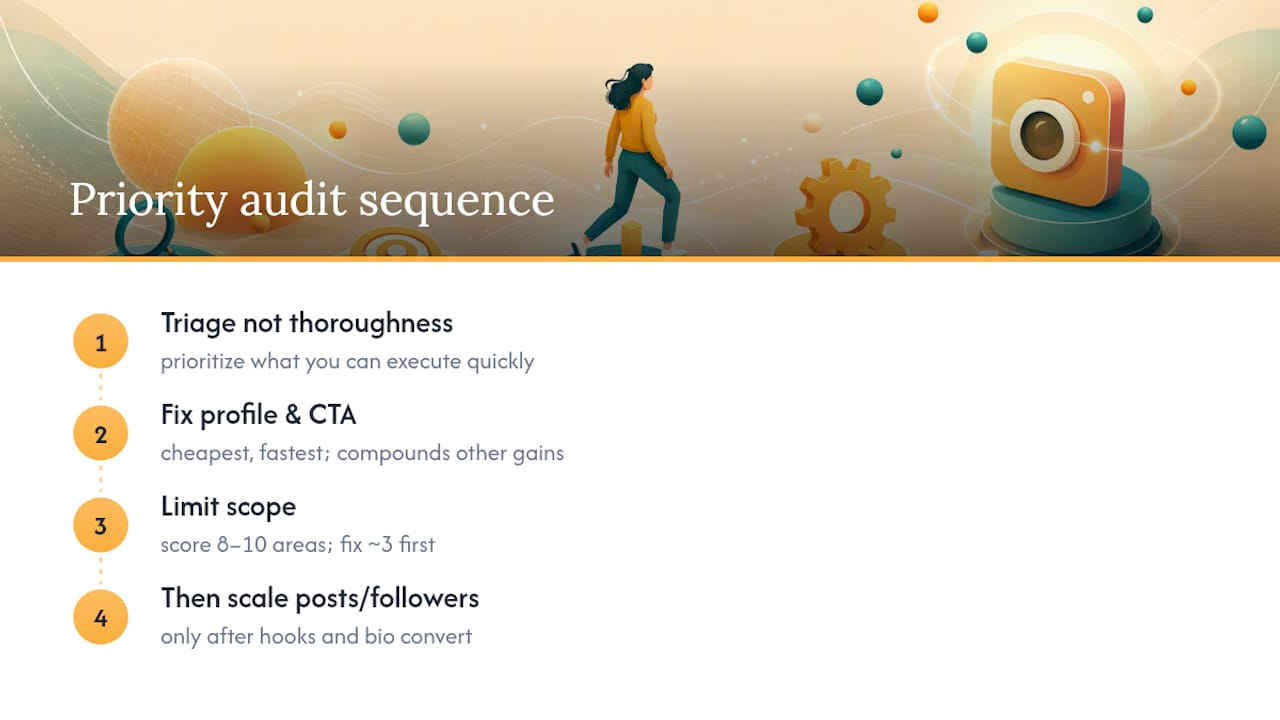
Most audit advice treats every metric as equally urgent, and that’s the biggest mistake small business owners make when they first try this. You don’t have the bandwidth of an agency team, so triage matters more than thoroughness.
The conventional wisdom obsesses over follower count and posting frequency, two of the least actionable numbers in the whole checklist. A follower count you can’t influence quickly tells you almost nothing about next week’s content plan. Posting more often without fixing a weak hook just produces more mediocre posts, faster.
What actually moves the needle, based on the pattern across every audit framework here, is the profile and CTA layer. It’s the cheapest fix, the fastest to execute, and it compounds every other improvement you make afterward. A stronger Reel hook means nothing if the bio link it drives traffic to doesn’t convert.
The other overlooked piece is restraint. Scoring eight or ten areas and fixing three isn’t a shortcut. It’s the actual discipline that separates small businesses that improve steadily from ones that burn out chasing every metric at once. Do the profile and bio first. Everything else gets easier once that’s solid.
Get Hands-On Help Turning Your Audit Into Growth
Running this checklist tells you exactly what’s broken. Fixing it while also running your business is a different challenge, and that’s where SOL Social Media’s social engagement services come in. Instead of a one-size-fits-all package, SOL builds a content and engagement plan around what your specific audit uncovered, whether that’s a weak CTA, a stale content mix, or a follower base that needs cleanup and re-engagement.

SOL Social Media works with small businesses across retail and healthcare who don’t have a spare 10 hours a month to babysit an Instagram account, offering everything from full management to targeted training sessions if you’d rather learn the process yourself. If your audit turned up more fixes than you can tackle solo, explore SOL’s social engagement services and book a conversation about which of your audit findings to prioritize first.
Sources
FAQ
How do I do an Instagram audit?
Pull 90 days of Insights data, score the 10 core areas (profile, content mix, engagement, hashtags, Stories, Reels, follower quality, and CTAs) on a 0 to 2 scale, then fix your three lowest scores first.
What is the 5-3-1 rule on Instagram?
The 5-3-1 rule is a posting framework suggesting five Stories, three feed posts, and one Reel per week, though the ideal ratio depends heavily on your niche and audience behavior rather than a fixed formula.
What should be included in an audit checklist?
A complete instagram audit checklist covers profile and bio, content format mix, engagement rate, top and bottom post analysis, posting frequency, hashtags, Stories and Highlights, Reels, follower quality, and CTA/link tracking.
Can ChatGPT audit Instagram?
ChatGPT can help interpret metrics you feed it, like calculating engagement rate or spotting patterns in your top and bottom posts, but it can’t pull live Instagram data itself, so you still need to export numbers from Instagram Insights first.
Recommended
Comments